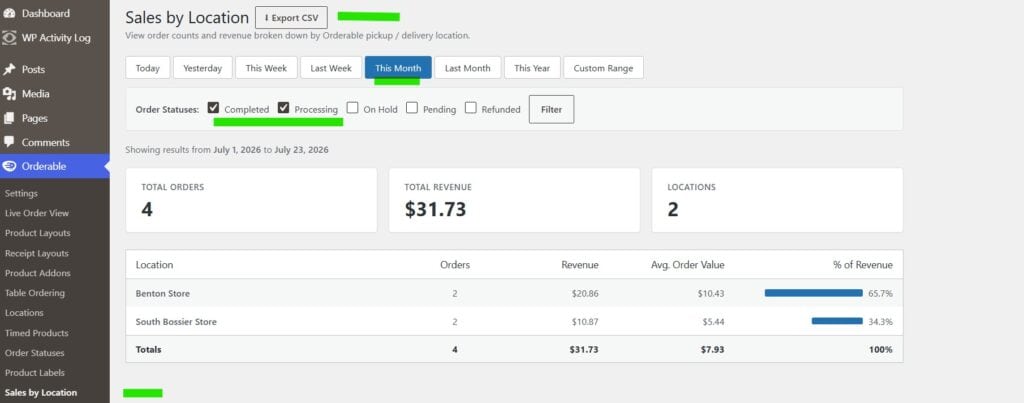
This provides a sales report by Orderable location and is a premium addon provided to you by WP CartCraft. This requires the Orderable Location Reports plugin to be installed on your website. If you have any questions about this, please reach out to us.
If you need to look at your total sales by Orderable location/store, we offer a full reporting mechanism to show a breakdown by store location.
Click on Orderable
Click Sales by Location
You have some quick action buttons to select the reporting period (i.e. This month, last month, etc.)
You can also use the Custom Range button to specify exact dates needed.
Select the Order Statuses that you want to include in the report; we recommend only Processing or Completed unless you want to look at orders not yet paid for, on hold, etc.
You will see the order stats and totals with a complete breakdown of orders by location, amount, average order value, and % of total revenue.
If you want to export these totals to a spreadsheet, click the Export CSV button at the top and this will make a file that can be used with Excel, etc.
Want to know more?
Sign up for our email list
WP Cart Craft builds high-performance websites for small businesses that want powerful tools. We combine open-source ownership, POS inventory sync, VPS hosting, and managed support to give you pro-level tools at a lower cost.
We are experienced in helping small businesses get their digital footprint out there. The platform we use is open source and flexible. It also powers 43% of websites on the internet. Contact us today to discuss what we can do for you.