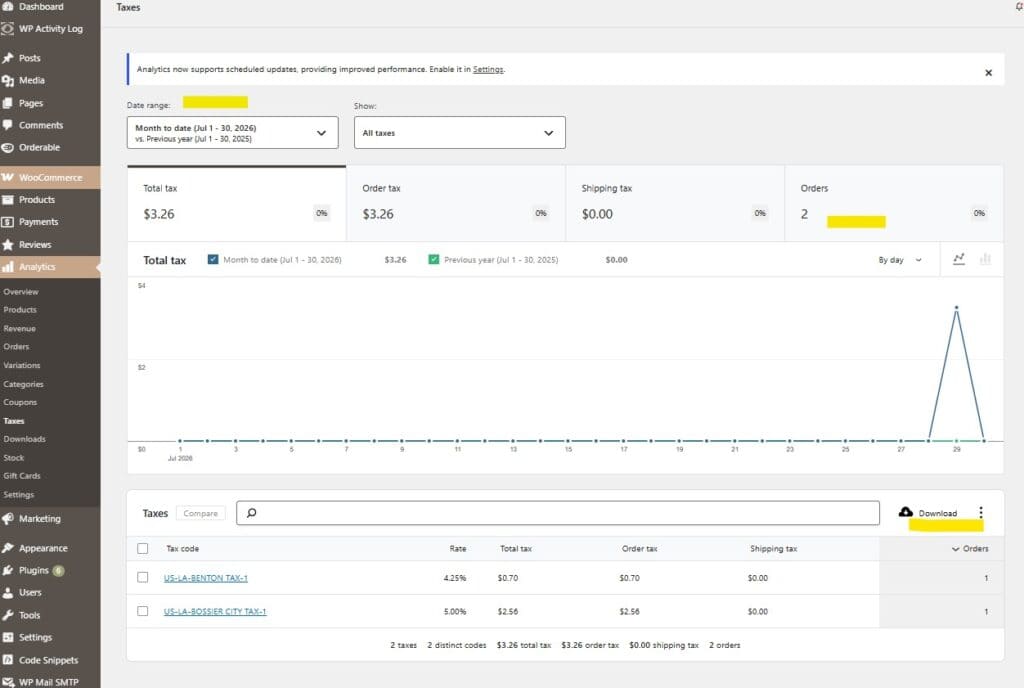
From the WordPress Admin Dashboard, click on Analytics.
Click Taxes from the sub menu.
You will see a dashboard showing the various sales taxes collected in the reporting period (by default this is set to the current month). However, you can change this to a number of presets like previous month, last year, or even a custom date range that you provide.
Scroll down to the bottom. You will see a complete breakdown of each tax collected within the reporting period.
You may also use the download button at the bottom of the report to export these figures to a spreadsheet if needed.
Note: The report will let you drill down on a number of data points for more details. For example, if you want to see the orders that contributed to these totals just click the Orders count to see additional details. This report has a number of interactive features like bar graph, comparison and lets you customize what you want to show in the show dropdown box.
Want to know more?
Sign up for our email list
WP Cart Craft builds high-performance websites for small businesses that want powerful tools. We combine open-source ownership, POS inventory sync, VPS hosting, and managed support to give you pro-level tools at a lower cost.
We are experienced in helping small businesses get their digital footprint out there. The platform we use is open source and flexible. It also powers 43% of websites on the internet. Contact us today to discuss what we can do for you.