First, you will need to be sure that your local sales tax rates are setup in WooCommerce if this has not been done already been done for your store.
We recommend that you read the WooCommerce article here: Setting up taxes in WooCommerce
-If in the United States, you will want to select “No, I will enter prices exclusive of tax”, since tax should be a separate calculation from the product price, unlike the UK and Europe that charge VAT taxes.
-This will need to be done on the product level
-In the dashboard go to Products
-Inside the product edit screen, inside the product data, general section,
-Click on the Tax Status dropdown
-Change it from “taxable” to “none“.
-Update the changes
Need to change a number of items at once?
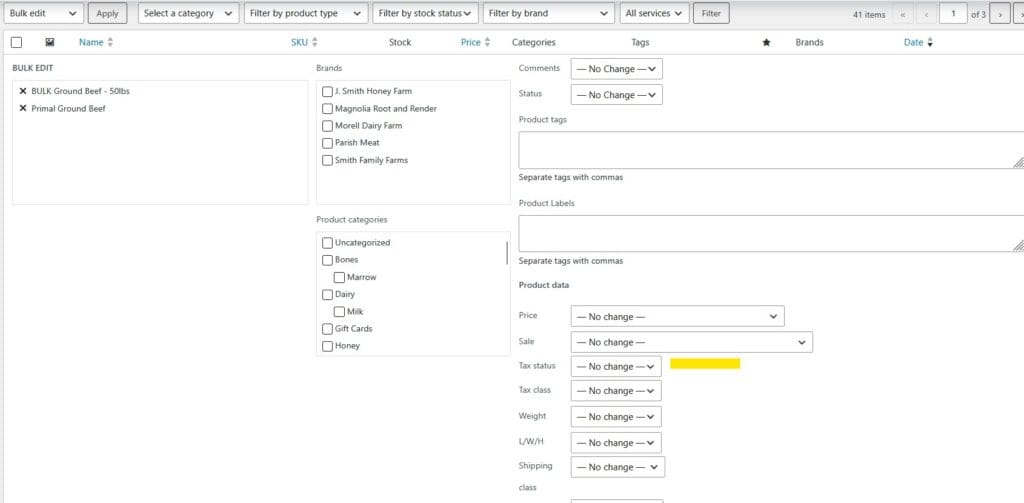
-Use the bulk editor by checking the appropriate items on the page of the product grid
-In the Bulk actions dropdown menu change it to Bulk edit
-Click the Apply button
In the bulk batch editor, change Tax Status to “none”.
Apply changes and this will bulk change the items you selected. Note: bulk edit batch changes only apply to the number of items on the page grid. So if you have 3 pages containing a total of 40 items, be sure to apply these changes on all three pages as applicable.
Need to see how to access sales tax reports?
See this article: https://wpcartcraft.com/knowledge-base/how-to-access-sales-tax-reports/