WARNING: Be careful when deleting users such as previous employees. It is critical that you make sure you do not delete their content they created if they have left your organization.
If you need to delete an employee that no longer works for your business, it’s important that you pay attention to any warnings regarding content they created.
If a WordPress user is the owner of any content, you’ll see this after clicking ‘delete’:
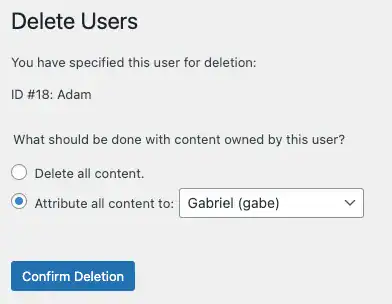
This is where a lot of WordPress administrators make a mistake and choose the first option: ‘Delete all content’. Don’t do that!
Be sure to choose the second option: ‘Attribute all content to: [username]’. That will change the ownership of the content from the user you are deleting to the user you are selecting. Now you can proceed and confirm deletion. To be safe, you can just attribute all of their content to the shop manager account.
First, Contact WP CartCraft Support
The quicker you contact us, the better chance we have of restoring your content provided not too much time has passed by.
Need to see a quick video on this? WP Learning Lab has a great video example on how to safely delete a user:
Article Attributions: The Gecko Agency, WP Learning Lab